
How to Get Campaign Keyword Suggestions with Keyword Planner for Better Advertising Results
If you want to get campaign keyword suggestions with keyword planner, understanding how Google Keyword Planner works is essential for building successful advertising campaigns. Businesses and marketers rely on this tool to discover relevant search terms, estimate traffic potential, and create strategies that attract the right audience. Learning how to get campaign keyword suggestions with keyword planner can improve campaign performance and help maximize return on investment.
Why Keyword Research Is Important
Keyword research forms the foundation of every effective digital marketing campaign. Without proper keyword selection, even well-designed ads may fail to reach potential customers. Research helps marketers understand user intent, identify trends, and target search terms that are most likely to generate conversions.
Using Keyword Planner allows businesses to make data-driven decisions rather than relying on assumptions. This leads to better visibility, improved click-through rates, and more efficient advertising spending.
Benefits of Using Google Keyword Planner
Google Keyword Planner offers several advantages for advertisers and digital marketers. Some of the most valuable benefits include:
- Discovering new keyword opportunities.
- Understanding average monthly search volumes.
- Evaluating keyword competition levels.
- Finding seasonal trends and search patterns.
- Estimating bid prices for paid campaigns.
- Planning marketing budgets more effectively.
Because the information comes directly from Google, marketers trust the tool to generate reliable keyword insights. Many professionals regularly get campaign keyword suggestions with keyword planner to improve targeting and increase campaign efficiency.
Get Campaign Keyword Suggestions with Keyword Planner
Follow these steps to discover valuable keywords for your campaigns.
1. Sign In to Google Ads
Access your Google Ads account and navigate to the Keyword Planner tool located under the Tools section.
2. Select “Discover New Keywords”
The Discover New Keywords option helps generate fresh keyword ideas based on products, services, or website URLs.
3. Enter Seed Keywords
Start with broad terms related to your industry. Examples include:
- Digital marketing services
- SEO agency
- Social media marketing
- Google Ads management
These initial keywords help Google generate more targeted suggestions.
4. Review Keyword Suggestions
The platform provides important information, including:
- Average monthly searches
- Competition level
- Estimated bid range
- Related keyword ideas
This data helps marketers get campaign keyword suggestions with keyword planner and prioritize keywords that match their objectives.
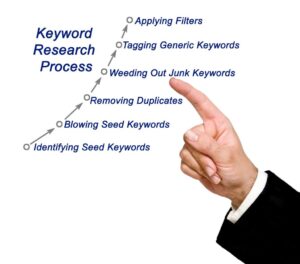
5. Apply Filters
Use filters to narrow down results according to:
- Location
- Language
- Search volume
- Competition level
- Industry relevance
Filtering improves keyword quality and ensures campaigns reach the right audience.