How to Optimize Google Business Profile for Better Local Visibility
If you’re wondering how to optimize google business profile, you’re already taking an important step toward improving your local online presence. A well-optimized profile helps your business appear in local search results, attract more customers, and build trust with potential clients. Whether you run a small business, local store, or service-based company, understanding how to optimize google business profile can significantly increase your visibility on Google Search and Maps.
Why Google Business Profile Matters
A Google Business Profile is often the first thing customers see when searching for products or services near them. It provides essential information such as your business name, address, phone number, website, reviews, photos, and operating hours.
When your profile is complete and regularly updated, Google is more likely to show your business in relevant local searches. This can lead to increased website visits, phone calls, and customer inquiries.
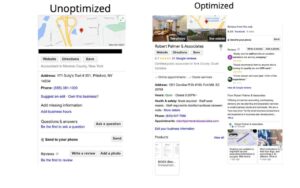
How to Optimize Google Business Profile Effectively
1. Complete Every Section of Your Profile
One of the most important steps in learning how to optimize google business profile is filling out every available section. Make sure your business information is accurate and consistent across all platforms.
Include:
- Business name
- Address
- Phone number
- Website URL
- Business category
- Operating hours
- Services and products
Complete profiles tend to perform better in local search rankings.
2. Choose the Right Business Category
Your primary category tells Google what your business does. Select the category that best matches your core service. You can also add secondary categories if they accurately represent additional services.
Choosing the correct category improves your chances of appearing in relevant local searches.
3. Add High-Quality Photos
Businesses with photos often receive more engagement than those without visual content. Upload professional images of:
- Your storefront
- Team members
- Products
- Services
- Office environment
Fresh photos signal that your business is active and trustworthy.

4. Encourage Customer Reviews
Customer reviews play a major role in local SEO. Ask satisfied customers to leave honest feedback on your Google Business Profile.
Respond to reviews professionally, whether they are positive or negative. Active engagement demonstrates credibility and customer care.
The more authentic reviews you receive, the stronger your profile becomes in Google’s local ranking system.
5. Keep Business Information Updated
Business details change over time. Ensure that your profile always reflects current information.
Update:
- Business hours
- Contact information
- Services
- Holiday schedules
- Special announcements
Accurate information improves user experience and helps maintain customer trust.
Use Keywords Naturally
Another key factor in understanding how to optimize google business profile is keyword optimization. Include relevant keywords in your business description, services, and posts without overstuffing them.
Focus on terms that customers actually search for when looking for your products or services. Natural keyword placement helps Google understand your business and match it with relevant searches.
6. Publish Regular Google Posts
Google Posts allow you to share updates, promotions, events, and announcements directly on your profile.
Regular posting can:
- Increase engagement
- Showcase offers
- Highlight new services
- Keep your profile active
Consistent activity signals relevance and freshness to both users and search engines.